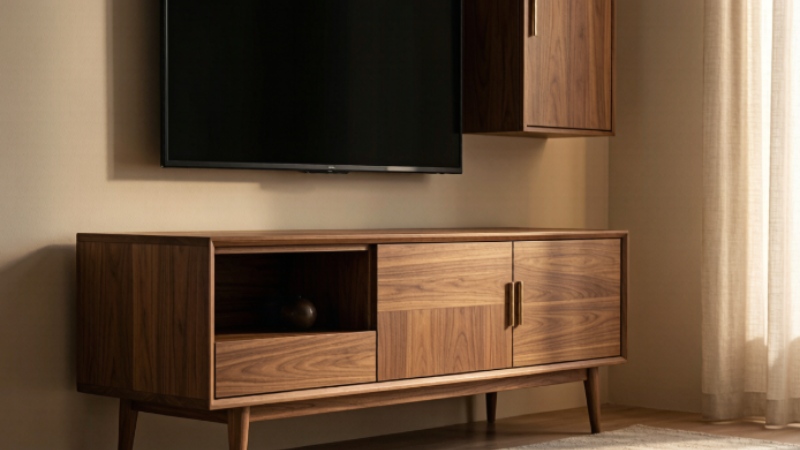
You finally bought the big screen, and now it sits on a wobbly old table with wires spilling out the back. I have been there, and it ruins the whole room. The fix is simpler than you think: a good modern media console cabinets turns that tangle into a tidy centerpiece.
Here is what I will walk you through. We cover the screen size rule, the storage features that actually matter, and the style moves that keep your living room looking planned rather than random. By the end you will know exactly which cabinet fits your TV and your space.
Let me start with the mistake almost everyone makes first.
Why the diagonal number lies to you
TV sizes are sold by the diagonal measurement, corner to corner. That number tells you nothing about the width you need on the furniture. A 65 inch TV is only about 57 inches wide. A 55 inch model is roughly 48 inches across.
The golden rule is easy. Your stand should be at least 6 inches wider than the TV, about 3 inches of breathing room on each side. This keeps the screen from looking top heavy and gives the whole setup a grounded feel. Go wider if your wall is wide, since a narrow piece on a long wall looks lost.
Match the console to your screen
| TV size (diagonal) | Real width | Stand width to aim for |
| 43 inch | ~38 in | 44 to 50 in |
| 55 inch | ~48 in | 54 to 60 in |
| 65 inch | ~57 in | 63 to 70 in |
| 75 inch | ~66 in | 72 to 80 in |
| 85 inch | ~74 in | 80 to 90 in |
Use that table as your shortlist. If your stand is not wider than the TV, the screen overhangs and the room feels off balance. Buy for the TV you will own next, not just the one you have. A little extra width now saves you a replacement later.
Get the height right too
Width is only half the fit. The center of your screen should sit at your eye level when you sit down, which for most sofas is around 42 inches off the floor. That usually puts the top of the stand near 20 to 30 inches high.
Too high means a sore neck. A screen parked above the cabinet forces your head back for a two hour film. Measure your seated eye line once and shop to that number, not to a showroom demo that sits low.
Open shelves versus closed doors
Open shelves suit a tidy tech lover who wants the gear on show. Closed doors suit a real household with remotes, chargers and the occasional mess. I lean closed because daily life is rarely photoshoot ready.
A mix is the sweet spot. Put the streaming box behind a door and keep one open shelf for a speaker you want to see. You get calm looks and quick access in the same piece.
Storage that hides the mess
Drawers and closed cabinets are the real win for a busy home. I keep my console closed up front so the room reads calm even when life is messy. Open shelves look airy but they show every remote and game box.
Look for a few specific features. Cord pass through holes at the back let you route HDMI and power out of sight. Adjustable shelves fit a soundbar or a console that is taller than the rest. Ventilation slots keep electronics cool, which matters more than people expect.
Cable management add ons
Even with pass through holes, a sticky cable channel down the back keeps things neat. I use a pack of three adhesive clips and a single braided sleeve. The whole job takes about ten minutes.
Label both ends of every cord with a bit of tape. The next time the soundbar drops signal you fix it in seconds instead of unplugging the lot and guessing.
Style that fits your room
Mid century designs with tapered legs and walnut tones feel warm and never go out of fashion. They lift the cabinet off the floor so the room looks larger. If your space is tight, a low profile piece keeps sightlines open.
Color choice is a small decision with big payoff. A wood tone that matches your floor makes the cabinet disappear into the room. A contrasting paint shade turns it into the focal point. Pick based on whether you want the TV area to blend or to pop.
Most buyers measure the TV but forget the wall. Stand width should be at least two thirds of the wall behind it for visual balance, and you should leave 2 to 3 feet of clear floor on each side so people can walk past without squeezing. Before you order, tape the cabinet outline on the floor with newspaper and live with it for a day. You will spot the traffic jams and the blocked outlet before the delivery truck arrives, which saves a return.
Materials and build quality
Solid wood stands stay stable and resist warping over years of use. Engineered wood is lighter and easier on the budget, and it is fine for smaller screens. For anything over 60 inches wide, check for a center support so the long top does not slowly sag.
Weight rating is not a detail you skip. A 75 inch TV plus a soundbar and a few boxes gets heavy fast. Read the listed capacity and keep a margin. The cheap stand that bends is the one you replace inside a year.
Cable routing without the headache
Even a great cabinet looks sloppy with cords dangling. I run a single power strip inside the center bay and bundle cables with Velcro ties. Label each cord so the next time a device dies you are not unplugging everything.
Wall mounting changes the math a little. The console under a wall TV still needs to be wider than the screen, or the whole wall feels floaty. The cabinet becomes pure storage, so use the drawers for the gear you want hidden.
Two console layouts to try
A low wide console under a wall TV keeps the room calm and the screen floating. A taller cabinet with open sides frames a TV that sits on top and adds storage below. I switch between the two depending on the room height.
Match the console to the TV height, not the other way. If your TV sits low, a short console looks right. A tall TV on a short stand strains the neck, so keep the two in scale.
Budget tiers that make sense
Under two hundred dollars gets you a basic engineered wood stand that does the job. Three to five hundred buys solid wood and softer close drawers. Past that you pay for size, real wood grain and designer legs.
Spend where the weight is. If you run a big TV, put the money into a sturdy frame rather than fancy handles. The screen is the expensive thing in the room, so support it well.
A quick buying checklist
Before you click buy, run through this: stand wider than the TV by 6 or more inches, closed storage for the clutter, cord pass through at the back, a center support if over 60 inches, and a finish that matches your room. If all five check out, you have the right piece.
You now have the full picture, from screen math to cable control. Matching a cabinet to your room and budget comes down to the few numbers above.