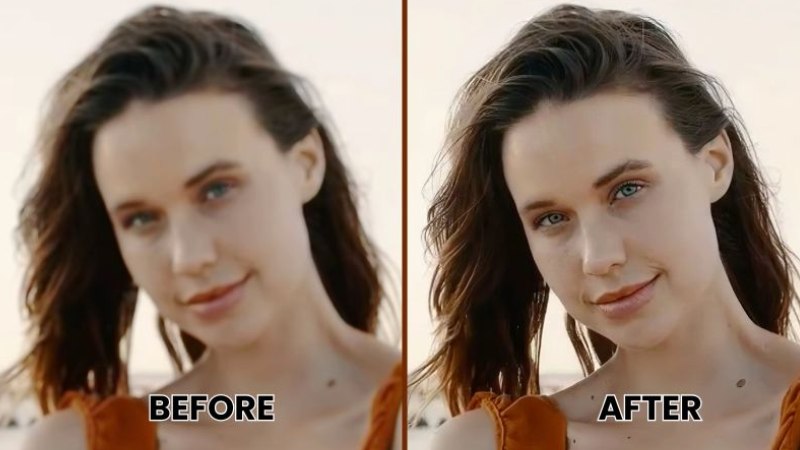
Screens keep getting sharper, but a lot of the footage we watch and create was never recorded for them. Home videos from older cameras, archived broadcasts, classic films, and even some modern streaming content often come in resolutions far below what today’s televisions and monitors can display. The result is footage that looks soft, blocky, or stretched on a large screen.
Video upscaling technology exists to close that gap, and it has improved dramatically in recent years. This article explains how it works, where it helps most, and what to expect from it.
What Does It Mean to Upscale Video?
To upscale video means to increase its resolution, for example turning a 720p clip into 1080p or a 1080p clip into 4K, while trying to preserve or enhance visual quality. At a basic level, a video is a sequence of images, and each image is a grid of pixels. When you enlarge that grid, the software has to decide what color each new pixel should be.
Early methods simply stretched the existing pixels, which produced blurry, blocky results. Modern approaches are far more refined, and tools such as an upscale video workflow now combine analysis of edges, textures, and motion to produce a cleaner result. The goal is not to create real detail out of nothing, but to make the best possible estimate of what the missing detail should look like.
Traditional Interpolation Methods
The oldest form of upscaling relies on interpolation. Algorithms such as nearest neighbor, bilinear, and bicubic interpolation calculate new pixel values based on the surrounding pixels. Nearest neighbor copies the closest pixel, which keeps edges sharp but creates a jagged look. Bilinear and bicubic methods average neighboring values, which smooths the image but often makes it look soft.
These methods are fast and require little computing power, which is why they are still built into many televisions, media players, and editing programs. However, they cannot recover fine detail such as hair strands, fabric patterns, or small text. They simply spread the existing information over a larger area.
The Rise of AI Based Upscaling
The biggest change in this field has come from machine learning. Instead of following a fixed mathematical formula, AI models are trained on large collections of paired images, one in low resolution and one in high resolution. Over time, the model learns what common visual elements such as faces, foliage, brick walls, and printed letters tend to look like at higher quality.
When it processes a new video, the model uses that learned knowledge to predict plausible detail for each frame. Common techniques include convolutional neural networks and generative adversarial networks, and more recent systems use diffusion based approaches. Because video is more than a stack of separate pictures, advanced tools also look at neighboring frames. This temporal analysis helps keep details consistent from one frame to the next and reduces flickering, a common problem when each frame is enhanced independently.
Common Use Cases
Video upscaling serves a wide range of practical needs.
Restoring older footage. Families and archivists often work with tapes and digital files recorded at standard definition. Upscaling can make these memories more watchable on modern displays, especially when combined with noise reduction and color correction.
Improving content for large screens. A clip that looks fine on a phone can appear soft on a 65 inch television. Upscaling helps match the content to the display so that it appears crisper from a normal viewing distance.
Supporting video production. Editors sometimes need to blend footage from different sources, such as archival clips, screen recordings, and drone shots. Bringing everything to a common resolution keeps the final project consistent.
Enhancing games and animation. Animated content and older video games often contain clean lines and flat colors, which respond well to upscaling. Many players use these techniques to enjoy classic titles at modern resolutions.
Preparing educational and business material. Training videos and recorded presentations are often captured at modest quality. Upscaling can improve readability of on screen text and diagrams when they are shared on larger displays.
Limitations Worth Understanding
Upscaling is useful, but it is not magic. The quality of the output depends heavily on the quality of the source. A heavily compressed, noisy, or very low resolution clip will limit what any algorithm can achieve. Models may also introduce artifacts, such as overly smooth skin, unnatural textures, or faint halos around edges. In some cases, an AI model may invent details that were never in the original scene, which matters if accuracy is important, for example in legal or documentary contexts.
Processing demands are another consideration. High quality AI upscaling can require a capable graphics card or cloud processing, and a long video may take considerable time to complete. Users should also be mindful of file size, since higher resolution videos need more storage and bandwidth.
Tips for Better Results
A few simple habits can improve the outcome of any upscaling project.
Start with the best source file available. An original recording is nearly always better than a copy that has been compressed and shared several times.
Clean the footage first. Removing noise, fixing interlacing, and correcting stabilization problems before upscaling gives the algorithm clearer information to work with.
Choose a sensible target resolution. Jumping from a very small frame to 8K rarely looks better than a careful move to 1080p or 4K.
Compare settings on a short clip before processing the entire file. Different models handle faces, landscapes, and animation differently, and a quick test can save hours.
Finally, keep expectations realistic. The aim is a cleaner, sharper, and more comfortable viewing experience, not a perfect recreation of footage that was never captured.
The Future of Video Enhancement
Real time upscaling is already common in modern televisions, graphics cards, and streaming devices, and the technology continues to move toward lower latency and better efficiency. Researchers are working on models that handle motion more accurately, preserve natural film grain, and respect the artistic intent of the original footage. As hardware improves, advanced enhancement is likely to become a standard feature rather than a specialist tool.
Conclusion
Higher resolution displays have raised the bar for how video should look, and upscaling gives creators, archivists, and everyday viewers a practical way to meet it. From simple interpolation to sophisticated AI models, the methods continue to evolve, offering cleaner results with less effort. Understanding how they work, and where their limits lie, helps you choose the right approach for each project. Whether you are restoring family recordings or preparing content for a modern screen, the ability to upscale video thoughtfully can make older footage feel far more at home in today’s viewing environment.